
Student Village Academy › Forums › ENTERTAINMENT › Music › Spotify’s Lossless Listening Makes Music Sound Amazing — Here’s How to Enable It
- This topic is empty.
-
AuthorPosts
-
-
September 15, 2025 at 2:24 PM #83647
 justseyiKeymaster
For years, Spotify users have begged for one thing above all else: higher-quality audio. Competing services like Apple Music, Amazon Music, and Tidal have long offered lossless or hi-res music streaming, leaving Spotify fans wondering when their favorite platform would finally step up. Now, after endless speculation and delays, Spotify has officially launched Spotify Lossless — and it’s every bit as impressive as promised.
Will Smith Faces Backlash Over Alleged AI-Generated Fans in Tour Video
Spotify is introducing in-app messaging
I’d heard whispers about it, but until I tried it myself, I didn’t quite understand just how much of a difference it would make. Songs that once felt familiar suddenly revealed subtle details — the brush of a drumstick, the faint echo of a backing vocal, the shimmer of a cymbal. Lossless streaming doesn’t just improve quality; it transforms the listening experience entirely.
Currently rolling out to Spotify Premium subscribers in phases across September and October, Lossless is set to become one of the platform’s most game-changing upgrades in years. If you’re serious about music, here’s everything you need to know about what Lossless is, why it matters, and how to turn it on.
What is Spotify Lossless?
Spotify Lossless is the platform’s highest audio quality tier, streaming in 24-bit/44.1kHz FLAC quality. That’s a massive leap from Spotify’s previous top setting of 320kbps, which already sounded decent but compressed out a lot of detail.
The difference lies in how the audio is delivered. With FLAC (Free Lossless Audio Codec), you’re hearing music that’s essentially identical to what the artist and engineers created in the studio — no information stripped away. The result is richer, fuller, and more dynamic sound.
Key things to know about Spotify Lossless:
-
Exclusively for Premium subscribers: Free-tier listeners won’t have access.
-
Available across devices: Works on mobile, desktop, and tablet.
-
Compatible with Spotify Connect: You can stream to supported speakers and sound systems without losing quality.
-
Gradual rollout: Not everyone has it yet. The update will continue to roll out automatically through September and October.
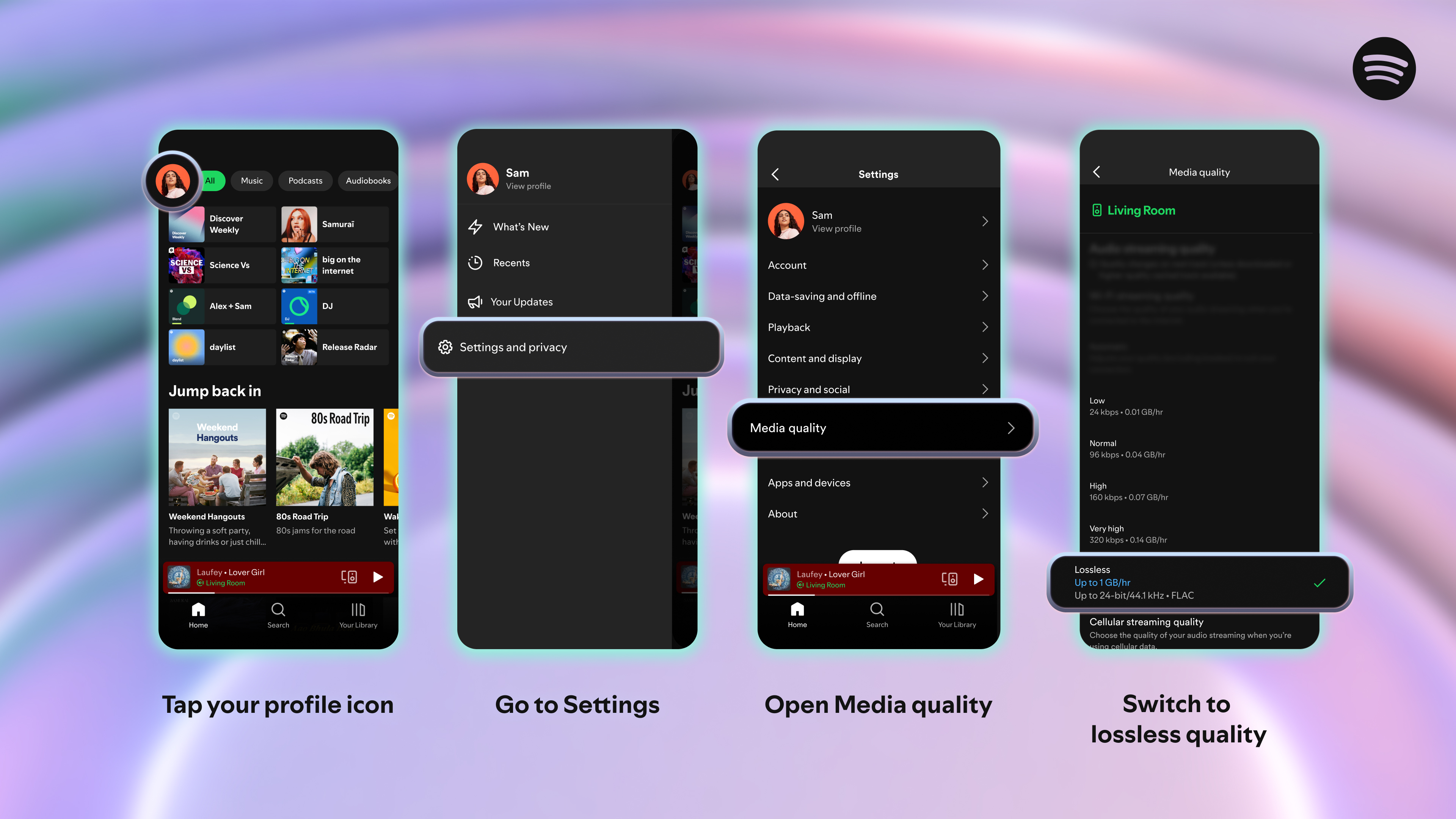
How to Enable Spotify Lossless
Once the feature hits your account, turning it on takes just a minute:
-
Open the Spotify app.
-
Tap your profile icon (top-left corner).
-
Go to Settings and Privacy.
-
Scroll to Media Quality.
-
Under Audio streaming quality, select Lossless.
A few important tips:
-
You’ll need to enable Lossless separately for Wi-Fi and cellular data.
-
Be mindful when using cellular — Lossless files are much larger and can eat through data quickly.
-
Repeat the process on every device you use Spotify on (the setting doesn’t sync automatically).
Getting the Most Out of Lossless
Enabling Lossless is just the first step — to truly enjoy the difference, you’ll want to pair it with the right setup:
-
Wired headphones or speakers are best. Bluetooth compresses audio, so you lose some of the benefits.
-
If you must go wireless, use Spotify Connect devices (like Wi-Fi speakers, soundbars, or headphones with 2.4GHz Wi-Fi dongles). These stream over Wi-Fi, which supports higher data transfer rates than Bluetooth.
-
Quiet environments highlight the improvements. In noisy places, subtle details can get lost.
-
Try acoustic tracks, classical music, or layered songs to hear the clearest differences.
Lossless doesn’t just make loud instruments pop — it adds depth, space, and warmth to everything from delicate piano notes to full orchestral arrangements.
Why Spotify Lossless Matters
The release of Lossless is more than just a feature update — it’s Spotify finally catching up to competitors and proving it can still deliver innovations fans crave. For casual listeners, the difference may feel subtle. But for audiophiles, musicians, or anyone who just wants to hear music closer to how it was meant to sound, this is a game-changer.
And it’s not just about music. For Spotify, this move strengthens its position in the high-resolution audio market, making Premium subscriptions more valuable than ever.
Final Thoughts
Spotify Lossless has been one of the most requested upgrades in the platform’s history — and it was worth the wait. By offering CD-quality FLAC streaming, Spotify has elevated its service into the realm of true high-fidelity audio.
If you’re a Premium subscriber, keep an eye out for the update as it continues rolling out. Once you enable it and pair it with the right equipment, you’ll quickly understand why so many listeners have been clamoring for this feature.
Music just sounds better when nothing gets lost in translation.
-
-
-
AuthorPosts
- You must be logged in to reply to this topic.