
Student Village Academy › Forums › TECH AND GADGETS › AI – Artificial Intelligence › Google Maps Integrates Gemini AI to Become Your “All-Knowing Copilot”
Tagged: AI, Gemini, gemini AI, google maps, maps
- This topic has 0 replies, 1 voice, and was last updated 4 months, 2 weeks ago by
 Shola joshua.
-
AuthorPosts
-
-
November 6, 2025 at 12:09 PM #85357
 Shola joshuaModerator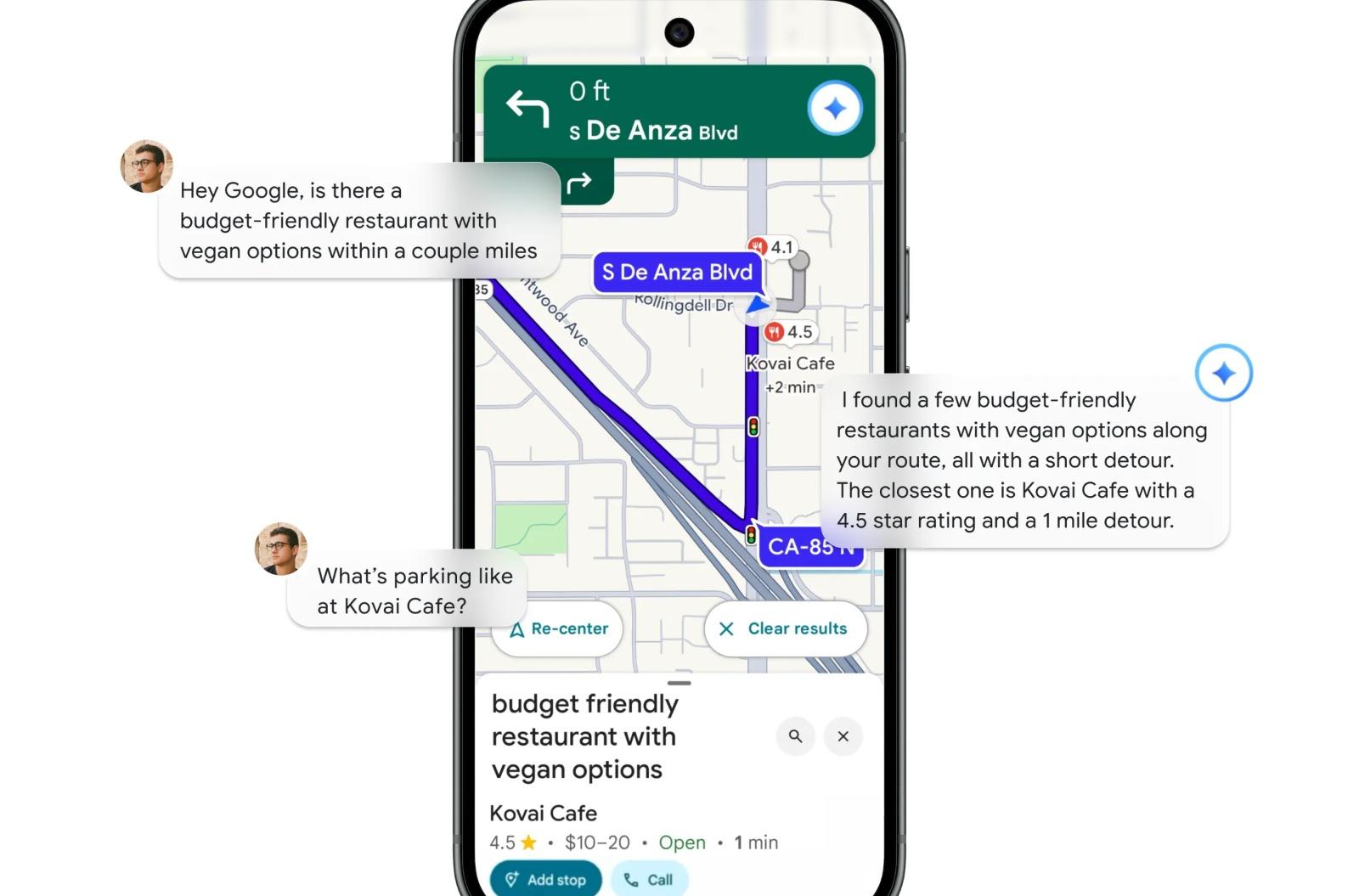
Now you can chat with Gemini about your route, nearby landmarks, or local businesses—right inside Google Maps.
Google Maps is taking a major leap forward by weaving Gemini, Google’s advanced AI chatbot, into its navigation system. The update introduces more “conversational” route planning and smarter guidance that references real-world landmarks and nearby businesses—essentially transforming Maps into an interactive travel companion.
Over the past year, Google has steadily infused AI into its core products. Maps, for instance, recently gained an upgraded Immersive View that allowed users to explore areas and ask questions about surrounding businesses. Now, Gemini is stepping into the driver’s seat—literally—by enhancing Maps’ route planning and live navigation.
“We’ve always envisioned Maps as your all-knowing copilot,” said Amanda Moore, Google Maps’ product director, during a press briefing. “It’s about giving you the exact information you need, when you need it, and taking the stress out of getting from A to B.”
With Gemini inside Maps, users can ask open-ended questions while driving or walking. The AI merges Maps’ geographical data with local insights, helping users discover new spots, get directions, or even learn about nearby businesses.
For example, you could ask Gemini to suggest restaurants along your route—and then instantly adjust your trip to stop at one. You can also report accidents, receive real-time traffic updates, or get a brief summary of relevant emails, news, or upcoming calendar events during your commute. Gemini can be activated by voice (“Hey Google”) or by tapping the Gemini icon in the top-right corner of Maps.
Gemini’s integration also extends beyond Maps. It can connect with other Google apps like Calendar, letting you add reminders or schedule events as you chat. All of this happens within the Maps interface.
“It’s connecting the dots between trusted information from the web, reviews from the Maps community, and Maps’ rich geospatial data,” explained Vishal Dutta, group product manager for Google Maps. “Gemini then pulls it all together using its summarization capabilities to give you one clear, useful answer while you’re on the go.”
Dutta described the experience as being “like having a friend who’s a local expert sitting in the passenger seat.”
In addition, Gemini is improving Google Maps’ voice navigation. Instead of relying solely on distance-based directions, it will now use recognizable visual cues—like “turn right after the Shell gas station” or “your destination is next to the blue café.” This is made possible by Gemini’s ability to process billions of Street View images and cross-reference them with Maps’ 250 million indexed locations.
Another new feature, Proactive Traffic Alerts, aims to make daily commutes smoother. Even when users don’t open Maps, Gemini will quietly monitor familiar routes in the background and alert drivers early about crashes, construction, or road closures—giving them time to reroute and avoid delays.
Gemini also powers a new Google Lens integration within Maps. By pointing your phone’s camera at a building or landmark, you can now ask Gemini questions about what you’re seeing—and it will respond with relevant information about that spot.
Of course, as with any AI system, accuracy remains crucial. Google insists it has minimized the risk of “hallucinations” by grounding Gemini’s answers in verified real-world data.
“We’ve worked hard to root this in our actual place information,” said Moore. “When you ask about places on your route, Gemini pulls from real, verified data—so there shouldn’t be any hallucinated or non-existent locations.”
All these features will be free for signed-in users and are gradually rolling out across Android and iOS, with future support planned for vehicles featuring Google built-in.
In short, Google Maps is no longer just about directions—it’s about having a smart, conversational copilot who knows the roads, the routes, and everything in between.
-
-
AuthorPosts
- You must be logged in to reply to this topic.