
UNILORIN Post UTME/Direct Entry Screening Form for 2026/2027 Admission [UPDATED]; The University of Ilorin (UNILORIN) has invited candidates who selected the institution as their first-choice university for the 2026/2027 academic session, either through the Unified Tertiary Matriculation Examination (UTME) or Direct Entry (DE), to register for its Post UTME screening exercise.
The university has advised all applicants to carefully read and follow the registration guidelines before making payment or submitting their applications. Any incorrect information supplied during registration will lead to automatic disqualification, and the University of Ilorin will not be held responsible for errors made by applicants.
Who Can Apply?
The Post UTME/Direct Entry screening exercise is open to candidates who selected the University of Ilorin as their first-choice institution for the 2026/2027 academic session.
Both UTME and Direct Entry candidates are eligible to participate and are required to complete their registration through the official UNILORIN undergraduate pre-admission portal.
UNILORIN Post UTME Registration Dates
Registration for the screening exercise will commence at 12:01 a.m. on Monday, 22 June 2026, and close at 11:59 p.m. on Sunday, 12 July 2026.
Candidates are expected to complete payment, NIN verification, upload their O’Level or A’Level details, and submit their applications before the registration portal closes.
How UNILORIN Admission Will Be Calculated
Admission into the University of Ilorin will be based on an aggregate score made up of the following components:
- UTME or A’Level score – 50%
- Post UTME screening score – 30%
- Five relevant O’Level grades – 20%
This means that admission is not based solely on UTME or A’Level performance. Candidates are therefore advised to provide accurate O’Level information before submitting their applications.
Requirements Before Registration
Before beginning the registration process, candidates should have the following ready:
- National Identification Number (NIN)
- O’Level Result Checker
- Personal and active email address
- Personal mobile phone number
- O’Level or A’Level result details, where applicable
- JAMB Registration Number
Applicants are strongly advised not to use another person’s phone number or email address, as these will be used for all future communication regarding their admission.
JAMB CAPS Requirements
Candidates must upload their O’Level and A’Level results, where applicable, to JAMB CAPS.
Applicants who are awaiting their examination results should indicate this by selecting or typing “AR”.
Candidates who wish to change their course or programme must do so on JAMB CAPS, not on the UNILORIN portal. The university will periodically download updates from JAMB CAPS and reflect them on its admission portal until the registration period ends.
After the registration deadline, no further course or programme changes will be updated on the university portal.
Courses That Require One Sitting O’Level Results
Only O’Level results obtained in one sitting will be accepted for the following programmes:
- MB;BS
- Pharmacy
- Optometry and Vision Science
- Computer Engineering
Candidates applying for these programmes are advised to carefully verify their examination records before submitting their applications.
Registration Fee
The UNILORIN Post UTME/Direct Entry registration fee is ₦2,000 only.
In addition to the registration fee, applicants will also pay charges for:
- NIN verification
- O’Level result verification
How to Register for UNILORIN Post UTME/Direct Entry Screening
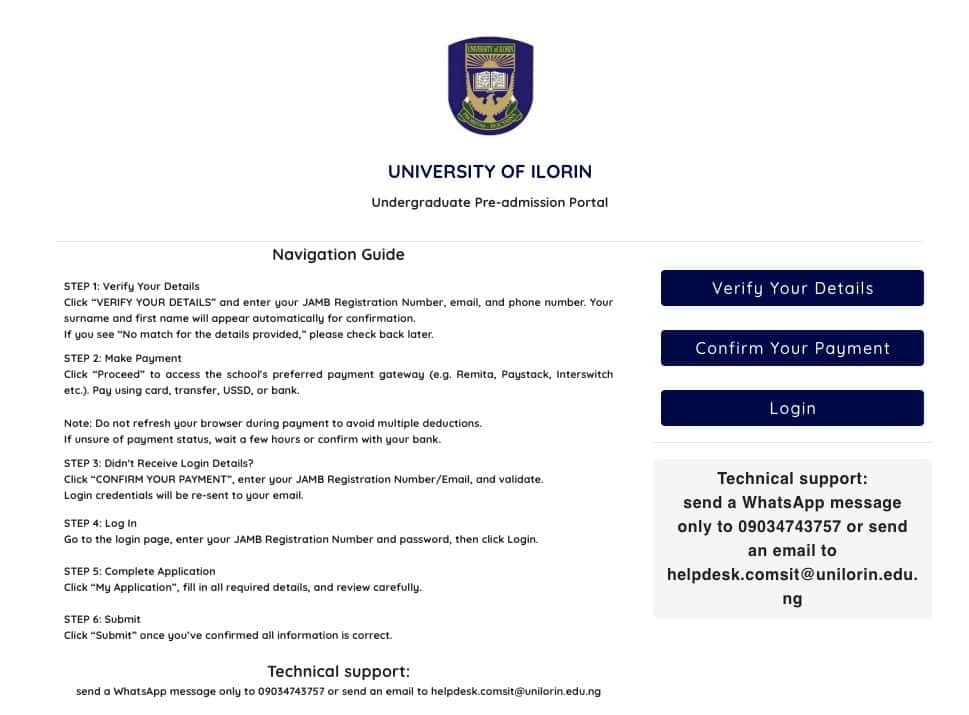
Candidates should complete their registration only through the official UNILORIN undergraduate pre-admission portal.
The registration process is as follows:
- Visit the UNILORIN undergraduate pre-admission portal.
- Click “Verify your details” on the right-hand side of the page.
- Enter your JAMB Registration Number, phone number, and email address.
- Confirm the surname and first name displayed automatically.
- Click “Verify” to proceed to the payment page.
- Select “Make payment” to access the Remita payment platform.
- Choose your ATM card type, such as Visa or MasterCard.
- Enter your ATM card number.
- Provide the card expiry date and CVV.
- Enter your card PIN and click “Pay.”
- Wait for the payment response without refreshing your browser.
- After successful payment, check the email address provided for your login details.
- Return to the UNILORIN portal.
- Log in using your JAMB Registration Number and the password sent to your email.
- Click “Application” from the left-hand menu.
- Complete all required information.
- Verify your NIN details.
- Enter your O’Level examination details and provide a valid result checker PIN.
- Carefully review your information and click “Submit.”
Candidates who are unsure whether payment was successful should wait for confirmation from their bank. They can then return to the undergraduate pre-admission portal and click “Confirm your Payment” using their JAMB Registration Number to validate the transaction.
NIN Verification
NIN verification is a one-time process.
Applicants should ensure that both their National Identification Number and date of birth are correct before proceeding, as the registration process depends on this information.
Information for Direct Entry Candidates
Direct Entry candidates are required to follow the same registration procedure as UTME candidates.
They must also select their highest academic qualification from the available options and provide all necessary academic information.
Upgrading from UTME to Direct Entry
Candidates wishing to upgrade from UTME to Direct Entry must first complete the upgrade through JAMB CAPS before beginning registration on the UNILORIN portal.
They should also confirm that the updated Direct Entry information is correctly reflected on the university portal.
Candidates Exempted from the Post UTME Screening Test
The following categories of applicants are exempted from the Post UTME screening examination:
- Candidates residing outside Nigeria who applied through UTME or Direct Entry. These applicants will be screened after admission.
- Candidates living with disabilities, including:
- Blind candidates
- Deaf candidates
- Mute candidates
- Autistic candidates
- Amputees
- Lame candidates
- Paralysed candidates
- Candidates with Down syndrome
- Candidates with Dyslexia
- Candidates with Attention Deficit Hyperactivity Disorder (ADHD)
- Candidates with albinism
- Candidates with cerebral palsy
- Candidates with physical disfigurement
Print Your Screening Documents
After completing registration, candidates should print their screening documents and carefully verify that every detail is correct.
If any information is incorrect, applicants should make the necessary corrections before the registration portal closes.
Final Checks Before Submission
Before submitting the application, candidates should carefully review all information provided. Any incorrect examination details may be regarded as deliberate falsification and could result in automatic disqualification whenever discovered.
Applicants should ensure that:
- The O’Level examination number on the UNILORIN portal matches the one on JAMB CAPS.
- The NIN on the UNILORIN portal is the same as the one on JAMB CAPS.
- UTME subjects and scores are correctly displayed on the screening slip.
- Their email address and phone number are personal and active.
- Any required course change has been completed through JAMB CAPS.
- A’Level results have been uploaded to JAMB CAPS where applicable.
- Candidates awaiting results have correctly indicated “AR” where necessary.
Complaints and Enquiries
Candidates who notice incorrect information on their screening documents should contact the University of Ilorin Admissions Office through admissions@unilorin.edu.ng.
For additional enquiries or technical support, applicants can send an email to helpdesk.comsit@unilorin.edu.ng.
Candidates are also advised to view the University of Ilorin dress code through the link provided in the official admission notice.